AACFree

A voice for every word.
Free, forever.

AACFree is an AAC communication app for autistic and non-verbal people, and the people who love them. It works on any browser and on Android, fully offline.

No adsNo subscriptionNo accountWorks offlineOpen source
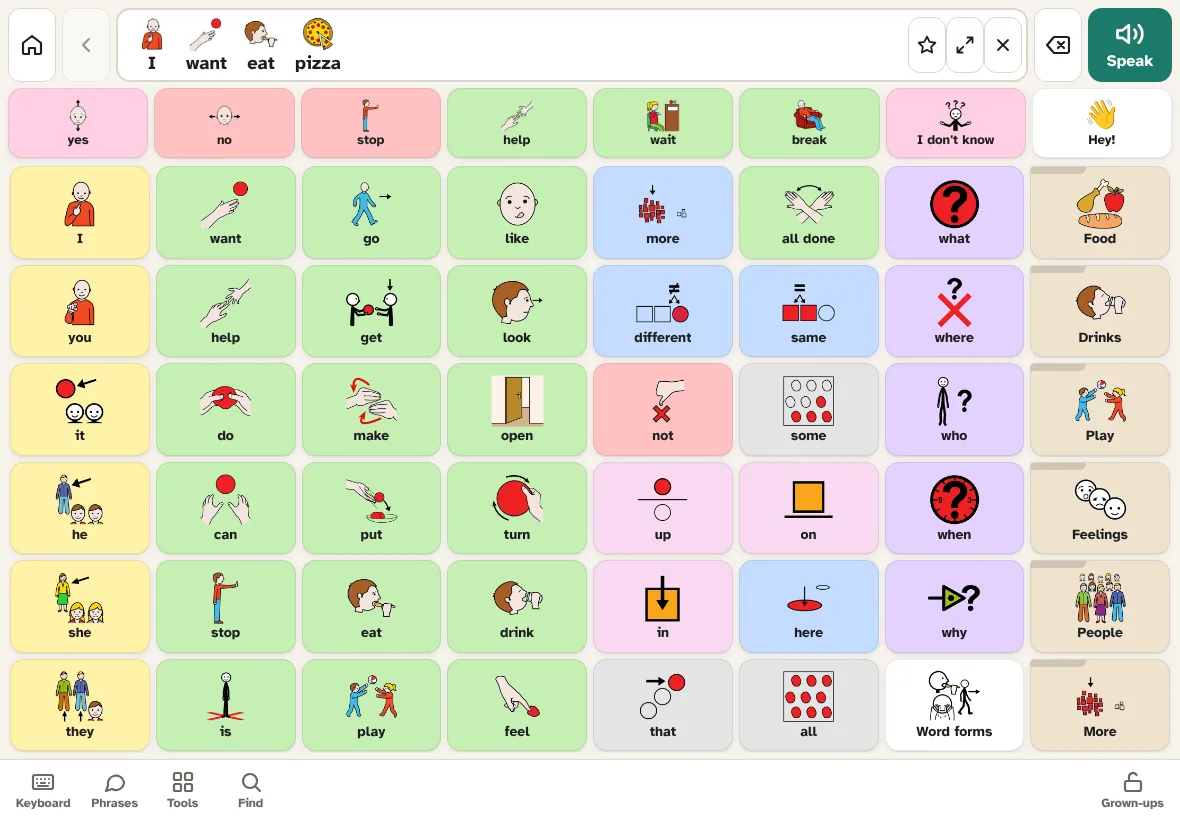
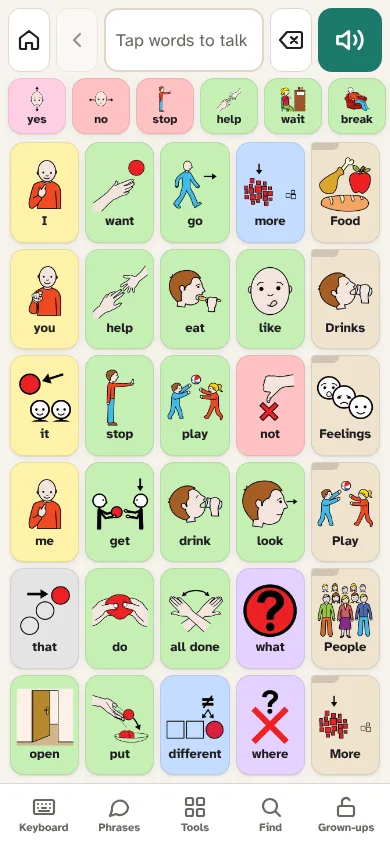
AACFree on a tablet: a grid of colour-coded word buttons with pictures, and the sentence 'I want eat pizza' in the message bar. AACFree on a phone with large buttons.

Built from what AAC users and families asked for

We read what autistic AAC users, parents and speech therapists say about existing apps. AACFree is designed around their top requests and their biggest frustrations.

✋

Words stay put

Core words sit in fixed places, so they can be learned by muscle memory. Grow vocabulary by revealing hidden words. Nothing gets rearranged.

🗣️

Talk fast

Symbols, a keyboard with word prediction, saved phrases and recent sentences all live in one app. There is no switching apps mid-conversation.

🛑

“No” is always there

Yes, no, stop, help, wait and break stay on every screen. Talking is never locked.

🔤

Grammar on demand

Long-press a word for go → went / going / goes, plurals and more. Nothing changes automatically.

💬

Scripts & gestalts

Save whole phrases, movie lines and scripts with one tap. This supports gestalt language processors.

♿

Access for every body

Hold-to-select, ignore repeated taps, 1- and 2-switch scanning with auditory cues, high contrast, a dark theme and adjustable text size.

🎙️

Real voices

Choose any voice on the device and set its speed and pitch. Record a family member's voice for special buttons.

🗓️

Daily supports

Visual schedules, first/then boards, a visual timer, choice boards, feelings and pain scales, a body map, an “About me” card and a drawing pad.

🌎

English · Español · Français · Português

Full interface and vocabulary in four languages, with automatic verb conjugation (yo + querer → quiero, je + aimer → j'aime). Settings can use a different menu language, and buttons can show a second language. Buttons keep their places when you switch.

👁️

Eye gaze & head pointer

Select by resting a pointer on a button: a mouse, head-mouse or eye tracker, or the front camera. Processed on the device; nothing is recorded.

🌙

Not childish

A calm “Clean” style for teens and adults, real-world phrases, and the person's own photos.
For parents, teachers and therapists

  • Edit in place: tap any button to change its word, picture, colour or voice. Tap two squares to swap them. Undo any change.
  • Symbol library in category folders: create your own categories and symbols, and build a board folder from any category in one tap.
  • Pictures for everything: 740 ARASAAC symbols built in, thousands more searchable online, plus camera photos and emoji.
  • Settings lock: a 2-second hold, a PIN or a math question keeps settings safe from accidental taps.
  • Never lose work: automatic daily snapshots, one-file backups and moving to a new device.
  • Paper boards: print boards as a low-tech backup for the pool, bath time or a flat battery.
  • Find word: shows step by step where any word lives. Great for modelling.
  • Private insights: off unless you turn it on. Shows most-used and new words, with CSV export for your SLP. Nothing ever leaves the device.
  • Share boards with other AAC apps via the Open Board Format (.obz).
  • Profiles for siblings or classrooms on one device.
  • Encrypted sync between a parent's phone and the user's tablet, with no account or server, and automatic backups (daily, weekly or monthly). On Android they can also go to Google Drive, OneDrive or Dropbox, and they can be locked with a passcode.
“AAC access needs to be 24/7.” Autistic AAC users

AACFree follows AAC best practice: model language by using the device yourself, presume competence, never take the device away, and treat babbling and exploring on the device as learning. The in-app Help & tips explain how, and the user guide covers every screen and setting step by step.

Web app: no install needed

AACFree runs in your browser at aacappfree.com/app. Add it to your home screen once and it opens full screen and works offline, like a normal app, with nothing to download from an app store.

iPhone or iPad (Safari)

  1. Open aacappfree.com/app in Safari.
  2. Tap the Share button (the square with an arrow pointing up).
  3. Scroll down and tap Add to Home Screen, then Add.
  4. From now on, open AACFree from its icon on your home screen.

Important on iPhone and iPad: use it from the home-screen icon. Safari can delete a website's saved data after about a week without a visit, but home-screen apps keep their boards.

Android phone or tablet (Chrome)

  1. Open aacappfree.com/app in Chrome.
  2. Tap Install when Chrome offers it, or tap the ⋮ menu → Add to Home screen (or Install app) → Install.
  3. Open AACFree from its new icon.

Computer or Chromebook (Chrome or Edge)

  1. Open aacappfree.com/app.
  2. Click the install icon at the right end of the address bar (a screen with a down arrow), or open the browser menu → Install AACFree (Edge: Apps → Install this site as an app).

Make sure it works offline

  1. The first time, keep AACFree open for a minute or two on Wi-Fi. It saves everything it needs on the device (about 20 MB).
  2. To check: turn on airplane mode, then open AACFree from its icon. Your boards should appear and talking should work.
  3. Updates arrive by themselves when you're online and are applied when AACFree is idle. Your boards, photos and settings stay on your device.

Next: the user guide takes you from first setup to your first sentence in five minutes, and explains every feature. Moving from another app? See bringing your boards across.

Android app (APK)

  1. Download the APK on your Android phone or tablet (Android 7+).
  2. Open it and allow “Install unknown apps” when asked.
  3. Tip: turn on App pinning in Android Settings so AACFree can't be closed by accident.

To update, install the new APK over the old one. Your boards are kept. More in the user guide.